Frequently asked questions
Everything about Sentinel hardware, the app, pricing, and getting set up on your boat.
Buying as a business?
If you’re purchasing a Sentinel bundle as a business, simply configure your bundle as usual and proceed to checkout. Enter your complete company and VAT details in the billing information.
When you place your order, your payment provider may temporarily authorize the full retail amount, including VAT. This is only an authorization — the final amount is determined before the payment is captured.
Our back office team will review the company and VAT information provided with your order. If your business details are successfully verified and the purchase qualifies for VAT-free treatment, we will capture only the net amount. The remaining authorized amount will not be charged.
Example:
Retail price including VAT: €1,200
Eligible business price excluding VAT: €1,000
Your payment method may initially show an authorization of €1,200. Once your business details have been verified, Sentinel will capture only €1,000.
If the company or VAT details cannot be verified, or the transaction does not qualify for VAT-free treatment, the applicable VAT will be charged.
Why is the price of your retail bundles different from the solution offered through boat manufacturers?
Different Solutions, Different Pricing
Our retail bundles are designed as aftermarket solutions for existing boats and include predefined hardware, features, and subscription options. Solutions offered through boat manufacturers are typically integrated during production and may be tailored to a specific brand, model range, or ownership experience.
Built Around Different Customer Journeys
As a result, the hardware configuration, included services, integrations, and overall pricing structure may differ. While both solutions are powered by Sentinel technology, they are designed to meet different customer and manufacturer requirements.
How does the purchase process work?
There are two ways to purchase a Sentinel solution, depending on your needs.
Bundles
If you’re looking for a complete, ready-to-install solution, you can purchase one of our Sentinel bundles directly through our online store. Simply choose the bundle that best fits your boat and complete your purchase online.
Custom Solutions
If you have specific requirements or would like to create a custom configuration, our team can help. Simply contact us using the enquiry form, and one of our experts will guide you through the available options, recommend the right hardware and sensors, and prepare a tailored proposal for your boat.
Any proposal provided by our team is completely non-binding, allowing you to explore the best solution before making a decision.
Where do I get support?
If you need assistance selecting the right configuration, please fill out the form on this page or contact our expert directly at sales@sentinelmarine.net.
In-app support is available once the subscription is active.
Does Sentinel integrate with digital switching systems?
Sentinel offers two ways to control onboard equipment remotely, depending on your boat’s configuration and the level of integration you’re looking for.
Remote Control Outputs
Sentinel includes built-in Remote Control Outputs for simple digital switching directly from the app. BM-50 STANDARD includes 1 Remote Control Output, BM-50 PRO includes 2 Remote Control Outputs, and the Sentinel HUB adds 2 additional Remote Control Outputs. These outputs can be used to remotely control selected onboard equipment such as lighting, pumps, heaters, refrigerators, and other supported systems.
Integration with Existing Systems
For more advanced installations, Sentinel can integrate with compatible digital switching and onboard monitoring platforms such as CZone, EmpirBus, and Simarine. These integrations provide deeper onboard visibility and expanded control capabilities through existing vessel infrastructure.
Compatibility Varies by System
Some integrations may require additional third-party hardware, subscriptions, certifications, or compatibility verification depending on the system installed onboard.
Are wireless sensor options available if I don’t want to use wired sensors?
Yes — when creating a Sentinel Custom setup, you can choose to replace wired sensors with wireless Bluetooth versions. Just indicate this preference in your requirements when completing the Sentinel Custom form.
Is my boat compatible with Sentinel?
Sentinel is compatible with most modern yachts and powerboats, including vessels with digital networks like NMEA 2000 as well as standard onboard sensors. If you’re unsure which setup suits your boat or whether a specific bundle is compatible, our configuration expert can help you select the perfect solution. Creating a personalized offer is completely free and comes with no obligation.
What kind of alerts will I receive?
Alerts notify you of triggered events such as power loss, water accumulation, unauthorized entry, critical readings, and more, depending on your setup.
What if my boat model is not on the list?
Simply select the closest option available. Once we receive your registration details, we will update the system with your exact boat model to ensure full compatibility.
Can I change or cancel my subscription?
Yes — you can upgrade, downgrade, or cancel auto-renewals via your Sentinel account. Devices continue functioning until the current subscription expires.
How do I register my boat in the app?
- Log in or create an account.
- Scan the QR code on your monitoring device.
- Add boat details (name, model, location).
- Enter your subscription activation code.
What does the subscription include?
- 24/7 data communication from your boat to the app
- Push notifications for events and alarms
- Access to supported monitoring channels
- Subscription management and renewal online
What payment methods are supported?
Bundle Purchases
Standard Sentinel bundles can be purchased directly through our online store using a range of secure payment methods, including major credit and debit cards, digital wallets, and other payment options available at checkout.
Custom Bundles and Solutions
Custom bundles and larger projects are quoted individually. Once the offer has been approved, payment is typically made via bank transfer based on the agreed commercial terms.
Need Help?
If you have questions about payment options or would like to discuss a custom project, our team will be happy to assist.
Who receives the equipment and how long does delivery take?
The equipment can be shipped directly to you or directly to your designated installer. If sent to the installer, they will have everything needed and arrive on the scheduled installation date.
Delivery begins once payment is confirmed. From that point, shipping can take up to 2 weeks, although most orders arrive within 3–5 business days, depending on your location and the courier service.
Can I install the system myself?
Yes. Sentinel offers two installation options, allowing you to choose the approach that best fits your needs.
Professional Installation (Recommended)
The recommended option is installation by a certified Sentinel Partner. They can recommend the right configuration, ensure the system is installed correctly, and provide ongoing support if needed. Professional installation also ensures full warranty coverage and access to technical support.
Self-Installation
Selected Sentinel bundles are designed for DIY installation and include everything needed to get started. Installation guides and video tutorials are available to help you through the process.
Please note that self-installed systems may have limited warranty coverage and do not include the same level of technical support.
How is the Sentinel system installed?
Sentinel offers two installation options, allowing you to choose the approach that best fits your boat, experience level, and requirements.
Professional Installation (Recommended)
Have your system installed by a certified Sentinel Partner. They will recommend the right configuration, ensure proper installation, and help you get the most from your Sentinel system.
Self-Installation
Selected Sentinel bundles are designed for DIY installation and include everything needed to get started. Step-by-step guides and video tutorials are available to help you complete the installation yourself.
Regardless of the installation method, the Boat Monitor can be expanded with wired and wireless sensors to match your boat and monitoring needs.
I have specific needs and none of the bundles exactly match what I’m looking for. What can I do?
Absolutely. While our bundles are designed around the most common boating needs, they’re not the only way to build a Sentinel solution.
If none of the available bundles match your requirements, simply contact our team through the enquiry form. A Sentinel expert will help you select the right Boat Monitor, sensors, integrations, and subscription plan to create a solution tailored to your boat and how you use it.
The consultation and proposal process is completely non-binding, allowing you to explore the available options before making a decision.
Can I test the solution?
Yes — you can use the free of charge Sentinel GO feature set within the Sentinel app and activate the Demo Boat to fully experience the system in a simulated environment. This lets you explore alerts, sensor readings, trip tracking, and other key features without any hardware or subscription.
What is the difference between Sentinel GO and Sentinel Premium?
Sentinel GO is the free tier of the app that allows you to track trips, manage maintenance logs, complete checklists, and use other core boating tools without any hardware.
Sentinel Premium, on the other hand, requires Sentinel hardware and an active subscription and provides full boat monitoring, including real-time battery status, sensor data, alarms, and remote control features for comprehensive vessel management and safety.
Do I need hardware to start using Sentinel?
No — you can start with Sentinel GO, the free feature set inside the app. With Sentinel GO, you can actively track trips, manage maintenance logs, complete checklists, and more without any hardware.
To try it, simply scan the QR code, download the app, and register your boat — or add the Demo Boat to experience premium features in a fully simulated mode, completely free. To unlock full boat monitoring, including battery status, sensors, tracking, and alarms, you’ll need to install Sentinel hardware and subscribe.
What is Sentinel and what can I do with the Sentinel App?
Sentinel is a connected boat ecosystem that combines hardware and software, allowing you to monitor, protect, and manage your boat from anywhere using your smartphone or tablet.
Through the Sentinel App, you can view live and historical system data, receive alerts on critical events like power loss or water ingress, access digital checklists, service records, and trip logs, and even share your boating adventures with friends and family.
Why do you ask for boat details during the registration process?
We ask for your boat details to provide you with the best possible experience using Sentinel GO. Many boats already have a factory-installed Boat Monitor. By checking your boat’s information against our database, we can confirm if you have one installed.
If your boat has a Boat Monitor, you can unlock premium features simply by subscribing—no additional hardware required!
If your boat doesn’t have a Boat Monitor, the details you provide help us customize the app’s features and settings to fit your boat perfectly, ensuring everything runs smoothly from the start.
What is the process for enabling Sentinel's service on my vessels?
Enabling Sentinels service involves equipping each vessel with our Boat Monitor BM-50 device, and purchasing a subscription option tailored to your needs.
What are the pricing options for Sentinel Fleet Management?
Sentinel offers flexible pricing tailored to the specific needs of your fleet, operating on a subscription model that includes real-time monitoring, data analytics, and support. Sentinel subscription can be easily managed through our online platform. To receive a detailed quote based on your requirements, please contact our team through our contact form here.
How can I get started with Sentinel Fleet Management?
To get started with Sentinel Fleet Management, simply reach out through our Contact Form here. Our team will connect with you to arrange a demo or consultation, ensuring a solution tailored to your business needs. We’re committed to helping you optimize operations and achieve your fleet management goals.
How does Sentinel ensure guest satisfaction with its fleet solutions?
At Sentinel, we prioritize guest satisfaction by providing a reliable and enjoyable rental experience. Our solutions include automated check-in and check-out, real-time tracking, and accurate trip logging for a seamless journey. To enhance the experience, we offer fun features like Postcard sharing, allowing guests to share their sailing adventures on social media with trip photos and route maps. Additionally, safety and transparency features ensure that your clients feel confident and secure throughout their trip.
How do I access Sentinel’s fleet data and analytics?
Fleet managers can access all data through the Sentinel web app or mobile app. The web app provides a comprehensive dashboard overview of the fleet, including live tracking, alerts, and performance analytics.
What type of reports can Sentinel generate for fleet operators?
Sentinel compiles data into user-friendly reports that help fleet managers monitor performance, maintenance needs, and compliance. Key reports include:
- Checkout report: Sentinel's „Checkout report” is a feature that provides a complete summary of the last vessel's trip and highlights potential issues and damaging events. Access all relevant statistics about how the boat was used while rented and simplify the checkout procedure upon return.
- Boat usage reports: The seasonal report gives you some working insights into each individual's boat health. The feature highlights boats with excessive usage, boats that sailed frequently in strong winds, poor batteries, and much more.
- Incident Reports: Documentation of any alerts triggered during trips, such as low fuel or unauthorized movements.
What hardware is required for Sentinel Fleet Management?
Sentinel provides the Boat Monitor BM-50, a monitoring device specifically designed for marine environments. Available in Lite, Standard, and Pro versions, it offers varying levels of functionality, including GPS tracking, battery monitoring, and NMEA2000 connectivity for advanced data collection.
Can Sentinel help improve my fleet’s profitability?
Yes, Sentinel’s data-driven insights help optimize boat usage and minimize operational costs. Features like remote diagnostics, automated reports, and performance analytics empower businesses to make informed decisions regarding fleet deployment, maintenance scheduling, and fuel management, ultimately maximizing revenue opportunities.
How does Sentinel help prevent boat damage and reduce maintenance costs?
Sentinel’s predictive maintenance and alert system allow fleet managers to identify and address potential issues before they escalate. By monitoring engine hours, battery levels, and system statuses, Sentinel helps schedule maintenance at optimal times, reducing the risk of unexpected breakdowns and lowering long-term repair costs.
What features does Sentinel offer to improve guest and rental management?
Sentinel provides several features tailored to enhance the rental experience and streamline operations for fleet managers:
- Trip Logging: Automatically records details of each journey, including position, course, and speed, for easy documentation and incident review.
- Geofence Alerts: This feature allows fleet managers to set up virtual boundaries around a vessel's intended operating area. If a vessel moves outside of these boundaries, fleet managers receive immediate notifications. This is essential for ensuring that vessels remain within designated operational limits and helps prevent unauthorized movements.
- Alert Zones: This feature lets fleet managers define high-risk areas to avoid while sailing. If a vessel enters an Alert Zone, the crew onboard receives an instant notification, allowing them to take timely action to ensure safety.
- Fuel Station Verification: This feature provides insights into when and where a vessel last visited a fuel station. While it cannot directly confirm if the vessel was refueled, fleet managers can assess fuel usage by analyzing the mileage traveled after the last petrol station visit. This helps ensure accurate tracking of fuel consumption and assists in managing costs effectively.
- Estimated Time of Arrival (ETA): Offers real-time tracking of vessels to optimize scheduling and prepare for incoming rentals.
- Digital Check-In & Check-Out: This feature simplifies the check-in and check-out process, making it contactless if needed.
How does Sentinel's real-time monitoring work?
Sentinel provides real-time visibility into your fleet by continuously collecting data from connected vessels. Depending on the hardware, sensors, and integrations installed on each boat, this may include:
- location
- battery status
- shore power
- onboard conditions
- engine data
- other operational information
Fleet managers can monitor vessel activity in real time, receive alerts when important events occur, and access key information through a single platform. The exact data available depends on the configuration of each vessel and the systems connected to Sentinel.
What is Sentinel Fleet Management, and how can it benefit my business?
Sentinel Fleet Management is a comprehensive solution designed for charter companies, rental businesses, and professional fleet operators. It enhances operational efficiency by providing real-time monitoring, automated reporting, and predictive maintenance alerts, ensuring that vessels are well-maintained and efficiently utilized.
In which countries is Sentinel's service available?
All latest generation Sentinel devices BM-50 operate worldwide.
European coverage (legacy devices only):
Austria
Belarus
Belgium
Belgium
Bulgaria
Croatia
Cyprus
Czech Republic
Denmark
Estonia
Finland
France
Germany
Greece
Hungary
Ireland
Italy
Latvia
Liechtenstein
Lithuania
Luxembourg
Macedonia
Malta
Monaco
Netherlands
Norway
Poland
Portugal
Romania
Serbia
Slovakia
Slovenia
Spain
Sweden
Switzerland
Worldwide coverage (roaming restrictions apply (eg. Turkey, Brazil)):
Afghanistan
Albania
Algeria
Anguilla
Antigua and Barbuda
Argentina
Armenia
Aruba
Australia
Austria
Azerbaijan
Bahamas
Bahrain
Bangladesh
Barbados
Belarus
Belgium
Belize
Benin
Bermuda
Bolivia
Bonaire
Bosnia & Herzegovenia
British Virgin Islands
Brunei
Bulgaria
Burkina Faso
Burundi
Cambodia
Cameroon
Canada
Cape Verde
Cayman Islands
Chad
Chile
China
Colombia
Costa Rica
Croatia
Cyprus
Czech Republic
Denmark
Dominica
Dominican Republic
Ecuador
Egypt
El Salvador
Equatorial Guinea
Estonia
Eswatini
Fiji
Finland
France
French Guyana
Gabon
Gambia
Georgia
Germany
Ghana
Gibraltar
Greece
Greenland
Grenada
Guinea
Haiti
Honduras
Hong Kong
Hungary
Iceland
India
Indonesia
Iran
Ireland
Isle of Man
Israel
Italy
Ivory Coast
Jamaica
Japan
Jersey
Jordan
Kazakhstan
Kenya
Kiribati
Kuwait
Kyrgyzstan Republic
Laos
Latvia
Lesotho
Liechtenstein
Lithuania
Luxembourg
Macau
Macedonia
Malaysia
Mali
Malta
Mauritius
Mexico
Moldova
Monaco
Mongolia
Montenegro
Montserrat
Morocco
Myanmar
Namibia
Nepal
Netherlands
New Caledonia
New Zealand
Nicaragua
Niger
Nigeria
Norway
Oman
Pakistan
Palestine
Panama
Papua New Guinea
Paraguay
Peru
Poland
Portugal
Qatar
Romania
Russia
Rwanda
Saudi Arabia
Senegal
Serbia
Sierra Leone
Singapore
Slovak Republic
Slovenia
Somalia
South Africa
South Korea
South Sudan
Spain
Sri Lanka
St Maarten
St. Kitts & Nevis
St. Lucia
St. Vincent & the Grenadines
Suriname
Sweden
Switzerland
Taiwan
Tajikistan
Tanzania
Thailand
Togo
Tonga
Trinidad & Tobago
Tunisia
Turks & Caicos
Uganda
UK
Ukraine
United Arab Emirates (UAE)
Uruguay
USA
Uzbekistan
Vanuatu
Venezuela
Vietnam
Zambia
Zimbabwe
Coverage on request (contact support for activation, limitations apply):
Bhutan
Botswana
Central African Republic
East Timor
Faroe Islands
French Polynesia
French West Indies
Guadeloupe
Guatemala
Guinea-Bissau
Guyana
Korea
Republic Of Kosovo
Lao People's Democratic Republic
Liberia
Madagascar
Malawi
Mozambique
Netherlands Antilles
Philippines
Puerto Rico
Réunion
Samoa
Seychelles
Swaziland
Yemen
Can I try Sentinel before committing to a purchase?
Yes! With Sentinel GO, you can:
- Register your boat for free
- Use digital logbook & trip tracking features
- Explore premium features in demo mode
This allows you to test the Sentinel experience before investing in hardware or a subscription. Download the app and get started:
Does Sentinel work with digital switching systems like CZone?
Absolutely! Sentinel integrates with CZone and other digital switching systems, allowing you to:
- Remotely control lights, appliances, heating & cooling
- Monitor and manage power consumption
- Automate onboard systems for convenience & efficiency
If your yacht is already equipped with CZone or another digital switching system, Sentinel seamlessly connects to enhance automation.
Is my boat compatible with Sentinel?
Sentinel is designed to work with most modern yachts (20ft–90ft), integrating with:
- NMEA 2000 systems (engine monitoring, fuel tracking, etc.)
- Standalone sensors (battery, shore power, bilge, door/hatch security)
- Digital switching systems (CZone, EmpirBus, etc.)
Not sure about compatibility? Contact us at info@sentinelmarine.net (or via Contact Form) for a free assessment.
What are the benefits of using Sentinel?
Owning a boat should be about freedom and adventure—not stress over unexpected failures, security risks, or maintenance surprises. Sentinel ensures that your boat is always safe, ready, and within reach, no matter where you are.
Peace of Mind, Always
- Never worry about battery failures, water intrusion, or unauthorized access—Sentinel alerts you the moment something needs your attention.
- Feel confident knowing that your boat is monitored 24/7, even when you’re miles away.
- Never worry about battery failures, water intrusion, or unauthorized access—Sentinel alerts you the moment something needs your attention.
- Feel confident knowing that your boat is monitored 24/7, even when you’re miles away.
Stay Connected to Your Boat, Anytime
- Track your boat’s location, power levels, and onboard systems in real time from your smartphone.
- Enjoy the reassurance of geofencing alerts—if your boat moves unexpectedly, you’ll know immediately.
More Time on the Water, Less on Maintenance
- Forget about unexpected breakdowns—Sentinel helps you track maintenance schedules and engine hours.
- Smart reminders ensure your boat is always ready for your next adventure.
Relive & Share Your Journeys
- Automatically log your trips and share your sailing experiences with friends and family.
- Every journey is stored in your digital logbook, creating a timeline of your adventures.
The Ultimate Boating Experience
Sentinel is more than a security system—it’s your personal boat assistant, making ownership effortless and giving you more time to enjoy the water.
Want to experience it yourself? Discover more at Sentinel for Boat Owners.
Where can I buy a Sentinel subscription?
Sentinel subscriptions can be purchased and renewed directly in our webshop.
-> Buy your subscription here: Sentinel Webshop
-> Need help with activation or renewal? Contact our support team at support@sentinelmarine.net.
Flexible plans available:
- Flexible subscription options to match your needs.
- Upgrade or downgrade anytime from your account settings.
How do I get started? (Step-by-step guide)
Getting started with Sentinel is simple! You can explore Sentinel’s features for free before making a purchase.
Step 1: Download the Sentinel App
- Download Sentinel – Your Boat, Online from the App Store or Google Play Store.
- Create an account and register your boat.
Step 2: Try Sentinel GO for Free
With Sentinel GO, you can start using basic features immediately, including:
- Free digital boat logbook
- Trip tracking & history
- Demo mode for premium features
Step 3: Choose Your Products
- Browse our range of Sentinel Bundles and select the solution that best matches your boat and cruising style.
- If you’re unsure which bundle is right for you, our experts are happy to help you choose the best configuration or create custom one.
Step 4: Place Your Order
Purchase your chosen bundle directly through our online store. Your bundle includes the first year of your Sentinel subscription, so you can start using the system as soon as it’s installed and activated.
Step 5: Choose Your Installation Method
You have two installation options:
Professional Installation (Recomended)
If you’d like your system professionally installed, complete the Request Professional Installation form. We’ll verify whether a Sentinel Certified Partner is available in your area. If one is available, we’ll provide an installation estimate before introducing you to the installer.
Self-Installation
Prefer to install the system yourself? Explore our Quick Tutorials for an overview of the installation process. You’ll also receive access to detailed Installation Guides with step-by-step instructions to help you install and activate your Sentinel system on your own.
Step 6: Start Monitoring
Once your Sentinel system is installed and activated, you’re ready to go. Open the Sentinel app to monitor your boat in real time, receive instant alerts, review trip history, access maintenance records, and stay connected to your boat from anywhere in the world.
What do I need to use Sentinel?
Three Core Components
A complete Sentinel solution consists of three core components:
- a Sentinel Boat Monitor
- a Sentinel subscription
- the Sentinel mobile app
Together, they enable remote connectivity, monitoring, alerts, and access to your boat from anywhere.
Expand Your System
Depending on your needs, you can expand the system with wired or wireless sensors that monitor specific onboard systems and conditions, such as:
- shore power
- bilge water
- movement
- doors
- temperature
- humidity
- and more
What is Sentinel, and how does it benefit boat owners?
Sentinel is an advanced boat monitoring solution that keeps you connected to your vessel anytime, anywhere. It simplifies ownership, enhances safety, and provides peace of mind through real-time alerts, trip logging, geofence and anchor monitoring, maintenance tracking, and direct communication with service partners.
What is the benefit of implementing the Sentinels solution to my brand?
Implementing Sentinel’s solutions enhances your brand by providing customers with real-time insights into their boats, including location, system status, and energy production. This not only improves the user experience but also reinforces your brand’s commitment to innovation and quality.
Our flexible, white-label integration allows you to offer a fully customized app, strengthening brand identity and customer loyalty. Features like switch control, sensor monitoring, and maintenance reminders add convenience and value.
Trusted by leading boat builders worldwide, Sentinel’s technology aligns with responsible yachting philosophies and enhances customer satisfaction. By partnering with Sentinel, your brand gains a competitive edge while delivering exceptional value to boat owners.
How can I integrate Sentinel's solutions into my boats?
To explore collaboration opportunities and learn more about integrating Sentinel's technology into your products, start by reaching out through our Contact Form. Our team will promptly contact you to discuss how we can support your needs.
What hardware solutions does Sentinel offer for integration?
Sentinel provides the Boat Monitor BM-50, a versatile and energy-efficient hardware solution designed for marine environments. With native NMEA2000 support and wireless expandability, it ensures seamless integration across all systems. Available in LITE, STANDARD, and PRO versions, the BM-50 accommodates boaters of all kinds, from leisure enthusiasts to seasoned professionals, adapting to their varying requirements. Built for durability and advanced performance, it delivers stable and reliable operation, even in the most demanding conditions on the water.
How does Sentinel's Partner Platform benefit boat builders?
The Partner Platform streamlines collaboration with boat owners by integrating monitoring solutions into your services. It enables efficient management of installations, real-time system health monitoring, and remote support, enhancing operational efficiency and customer satisfaction. Additionally, the platform strengthens after-sales service through features like a newsfeed and messaging system, allowing boat brands to communicate directly with users. This includes publishing articles, promotions, and important updates, ensuring owners stay informed and engaged while maximizing the value of their investment.
What features does Sentinel provide to enhance the boating experience?
Stay Connected to Your Boat
Sentinel helps boat owners stay connected to their boat from anywhere. Depending on the selected hardware and sensors, you can monitor battery status, shore power, bilge water, location, movement, onboard conditions, and many other critical systems through a single app.
Monitor What Matters Most
Available features include:
- GPS tracking
- geofencing
- battery monitoring
- shore power monitoring
- intrusion detection
- bilge alerts
- temperature and humidity monitoring
- engine monitoring
- maintenance reminders
- trip logging
- digital checklists
- document storage
Features Vary by Configuration
The available features depend on the selected Boat Monitor, sensors, integrations, and subscription plan. Some advanced capabilities may require additional hardware or compatible onboard systems.
What customization options are available with Sentinel's solutions?
Sentinel offers flexible integration options, allowing you to use our Sentinel app, adopt our technology under your brand, or develop a fully custom application using our public API. This approach enables you to tailor the user experience to align with your brand identity and meet specific customer needs.
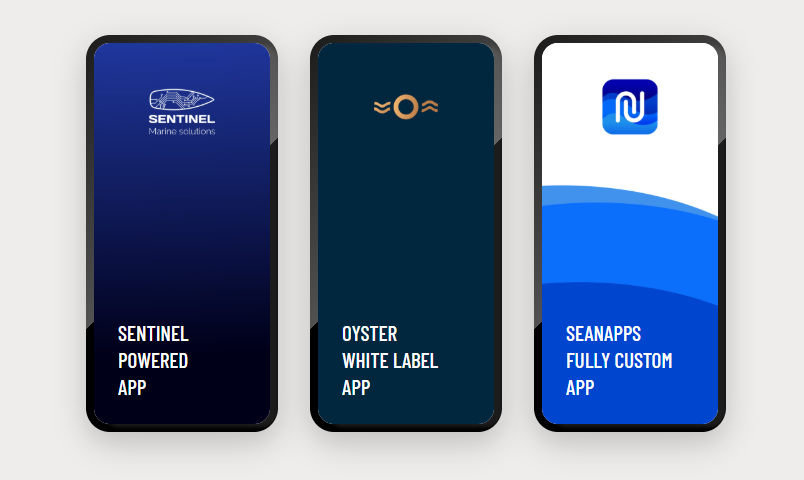
How can integrating Sentinel's technology benefit my brand?
By incorporating Sentinel's technology, your brand can position itself as a leader in marine innovation. Benefits include enhanced boat value and appeal, access to valuable data insights for refining designs, and the ability to offer customers a seamless, branded experience with advanced monitoring and control features.
What solutions does Sentinel offer for boat builders?
Sentinel provides advanced digital solutions designed to enhance the boating experience and seamlessly integrate with your brand. These solutions include real-time monitoring, remote control features, and customizable applications that can be branded to strengthen customer loyalty and deliver exceptional value.
How do I create an account and start using Sentinel GO?
To create an account and start using Sentinel GO, follow these simple steps:
- Download the Sentinel – Your Boat, Online app from your device’s app store (available for both iOS and Android).
- Create an Account: Open the app and sign up using your email address and password.
- Set Up Your Boat Profile: Add your boat details and wait for the confirmation email.
- Access Free Features: Once your account is active, you can start using the free Sentinel GO features — including trip checklists, GPS trip tracking, and your digital maintenance logbook.
- Explore Premium Mode: Try the Demo Boat to see how Sentinel’s connected system works before upgrading with hardware.
Sentinel GO is the free feature set inside the Sentinel app — your easy start into smarter, connected boating.
Are there any restrictions or obligations after becoming a certified partner?
No. There are no minimum sales requirements, exclusivity agreements, or long-term commitments associated with becoming a certified Sentinel Partner.
However, all partners are expected to represent the Sentinel brand professionally and maintain the standards of quality and customer service associated with the Partner Program.
Participation in the program does not obligate you to accept any installation or business opportunity. However, once you accept a project or service request, you are expected to complete it in a professional and timely manner.
What happens if I want to leave the program?
If you wish to leave the program, you can simply notify us. While we hope to maintain long-term partnerships, we understand that circumstances change, and you are free to exit at any time. However, if you have already accepted a job, you are obligated to complete that task before leaving the program. For any other situations, you are free to exit without any further commitments.
Who can join the Sentinel Partner Program?
Companies and self-employed individuals can join the Sentinel Partner Program. The program is designed for businesses, with enrollments made through the company only, ensuring the correct invoicing and other necessary processes are followed. A company can enroll multiple employees, allowing them to become certified installers and expand business opportunities. For individuals, the program offers opportunities as well, with self-employed installers eligible to join and execute installations under their own name. Companies are recognized as Gold partners, trusted for their expertise, while Silver partners are individual installers executing installations.
Is this program open to international installers?
Yes, the Sentinel Partner Program is open to installers worldwide. Whether you're in Europe, the Americas, or Asia, our global network ensures that all certified partners have access to opportunities in their region.
What information do I need to provide during the application?
You’ll need to share basic details about yourself or your business, including your contact information, location, and relevant professional experience.
How do I apply to join the Sentinel Partner Program?
Getting Access to the Academy
To apply, simply send us an email introducing your company, your service area, and your area of expertise. This helps us understand your business and determine whether we’re currently looking for partners in your region.
What Happens Next?
If we do not already have an active partner covering your area, you’ll receive access to the Sentinel Academy along with instructions on how to complete the certification process and take the next steps toward becoming a Sentinel Partner.
Are there limited spots available for each tier?
There is no fixed limit on the number of Silver, Gold, or Platinum Partners. However, Sentinel carefully manages partner coverage to avoid oversaturating individual regions and to ensure meaningful opportunities for active partners.
When applying, we consider factors such as your location, services, experience, and existing partner coverage in the area. In some regions, applications may be placed on hold if we already have sufficient partner representation.
What are the exclusive benefits of being a Platinum partner?
Access to the Full Sentinel Ecosystem
Platinum Partners can leverage a broader range of Sentinel solutions to support and grow their business. This may include access to selected customer engagement tools, Sentinel GO and white-label opportunities, and additional services designed to help partners create long-term value for their customers.
Strategic Business Support
Platinum Partners work closely with the Sentinel team to identify opportunities where our technology can support their business. This includes dedicated guidance, early access to selected initiatives, and collaboration on new ways to generate recurring revenue, strengthen customer relationships, and expand service offerings.
How can I qualify for a higher partnership level?
Advancing from Silver to Gold is based on a combination of sales volume, partner activity, and individual business discussions with the Sentinel team.
If you’re interested in moving to a higher partnership level, we recommend speaking with your Partnership Manager. They will review your current activity, discuss available opportunities, and help you understand the requirements and benefits associated with the next level.
What are the differences between Silver, Gold, and Platinum partnership levels?
Silver Partner
Silver is the entry level of the Sentinel Partner Program. After completing the certification, partners gain the right to sell and distribute Sentinel solutions, receive installation and business opportunities, and access partner pricing. Silver Partners start with a 20% hardware discount, along with access to training resources, technical support, and marketing materials.
Gold Partner
Gold is designed for partners who actively promote and grow the Sentinel business. As sales and engagement increase, partners can unlock improved commercial conditions, including discounts of up to 40% on hardware, as well as additional marketing and business development opportunities.
Platinum Partner
Platinum is intended for highly engaged partners looking to build their business around the full Sentinel ecosystem. In addition to commercial benefits, Platinum Partners can leverage tools such as Sentinel GO, white-label opportunities, customer engagement solutions, and dedicated business support to create recurring revenue streams and strengthen customer relationships.
What kind of tools or equipment will I need to complete installations?
You’ll need basic tools for electronic equipment installation, such as screwdrivers, cable cutters, and multimeters. Specific details about tools and setup will be provided during the training.
Who do I contact for help with the certification process or job-related issues?
For any questions related to the certification process, installation opportunities, or job-related matters, your dedicated Partnership Manager will be your first point of contact. They can help with onboarding, provide guidance, answer questions, and ensure you have the information you need to get started successfully.
How does Sentinel support certified installers in managing jobs?
Stay organized with Sentinel Marine’s clear job descriptions and direct email communication, making it easy to manage and respond to service requests efficiently.
Do I need to travel for installations, and how is travel compensated?
Travel requirements depend on the type of opportunity.
Sentinel-Generated Opportunities
For opportunities provided through the Sentinel ecosystem, any travel requirements and compensation terms will be clearly communicated before you accept the job.
Your Own Installations
For installations generated through your own sales and customer relationships, all commercial terms — including travel costs, installation fees, and reimbursement arrangements — are agreed directly between you and your customer.
Are there any examples of earnings potential as a certified installer?
Yes, for example, a standard installation job requiring approximately three hours could earn you €600 + VAT. Actual earnings will vary based on location, job type, and additional services provided.
What factors influence my earnings as a Sentinel partner?
Your earnings as a Sentinel Partner depend on several factors, including:
- your region
- level of activity
- local demand
- overall engagement with the Partner Program
Partners who achieve the best results typically combine opportunities received through the Sentinel ecosystem with their own sales and marketing efforts. By actively promoting Sentinel solutions to existing customers, recommending the system during service work, and generating their own installations, partners can significantly increase both revenue and long-term business opportunities.
How is payment handled for completed jobs?
Payments are arranged directly between you and the client. Sentinel provides clear job details upfront, so you know the expected scope and compensation before accepting a job.
What type of jobs can I expect as a certified installer?
As a certified installer, you’ll primarily handle the installation of Sentinel’s boat monitoring systems. Depending on the client’s needs, you may also install additional sensors or perform related services.
How will I receive service requests after certification?
Service requests will be sent directly to you via email. This streamlined process ensures you’re always updated and can manage your jobs efficiently.
What happens after I pass the certification exam?
You’re Ready to Get Started
Once you pass the certification exam, you’ll become a certified Sentinel Partner and gain access to the Partner Program. You’ll be able to purchase Sentinel products at partner pricing, access program resources, and explore installation and business opportunities available in your region.
Partner Onboarding
After certification, you’ll be invited to an onboarding meeting with the Sentinel team. During this session, we’ll explain how the Partner Program works, answer your questions, discuss opportunities in your region, and help you take the next steps as a Sentinel Partner.
Is the training conducted online or in person?
The training is entirely online, making it accessible and convenient for participants worldwide.
How long does it take to complete the certification course?
The certification course consists of approximately 1 hour of training videos, covering everything from installation procedures to system integration and troubleshooting. Since the training is self-paced, most participants complete it within a few hours, depending on their schedule and prior experience.
What does the Sentinel Academy training cover?
The training covers everything you need to know about installing Sentinel's boat monitoring systems, including technical installation steps, system integration, and troubleshooting. It also provides insights into product features and how to deliver a seamless experience to boat owners.
Can I join the program if I am not located near a major boating hub?
While professionals in high-traffic boating areas may receive more opportunities, our program is designed to support partners worldwide. However, if your location has fewer boats or is not a major sailing hub, service requests may be less frequent. We encourage partners in such areas to consider this when assessing potential business opportunities.
Are there any fees for joining the program or completing the training?
No, the training and certification are completely free for all participants.
How does the certification process work?
The certification process involves completing a comprehensive online training course followed by a certification exam. This process is entirely online, allowing participants to complete it at their convenience.
What levels are available in the Sentinel Partner Program (Silver, Gold, Platinum)?
The program offers three partnership levels:
- Silver – Get certified and start receiving direct service requests from Sentinel and our dealers, adding new jobs to your schedule with no extra hassle.
- Gold – Scale your service with the ability to sell retrofit kits, and installation orders from Sentinel and beyond.
- Platinum – Become the go-to service partner in your region, receiving priority in Marketplace service requests from over 25,000 connected boats, along with increased earnings from installations, product margins, and service fees.
What are the benefits of becoming a certified Sentinel installer?
As a certified Sentinel Partner, you’ll gain access to partner pricing, training resources, technical support, and the right to sell and install Sentinel solutions. You’ll also be eligible to receive installation opportunities and grow your business by offering connected boating solutions to your customers.
Who can join the Sentinel Partner Program?
The Sentinel Partner Program is open to both companies and self-employed professionals working in the marine industry. Typical partners include:
- marine electricians
- installation companies
- service centers
- boat dealers
- marinas
- other businesses that support boat owners
What is the Sentinel Partner Program?
The Sentinel Partner Program is a global initiative designed to create a network of certified professionals who can install our advanced boat monitoring systems. By joining, partners gain access to exclusive job opportunities, training, and resources, enabling them to grow their business while supporting Sentinel's mission of enhancing safety and connectivity in the marine industry.
How can I provide feedback or ask further questions?
We’d love to hear from you! If you have questions or feedback, feel free to reach out to us at info@sentinelmarine.net. Your input helps us make Sentinel GO even better.
What devices are compatible with Sentinel GO?
Sentinel GO is be available on both iOS and Android devices, so you can use it on your smartphone or tablet.
What makes Sentinel GO different from other boating apps?
Sentinel GO stands out because it:
- Requires no additional hardware, making it accessible to all boaters.
- Offers powerful features for free, such as checklists, trip tracking, and maintenance management.
- Simplifies boating tasks, giving you more time to enjoy the water.
Sentinel GO is your gateway to smarter, stress-free boating.
Who is Sentinel GO for?
Sentinel GO is designed for every boat owner. Whether you have a small motorboat or a larger yacht, you can use its free features to organize, plan, and track everything related to your boat — making ownership simpler, smarter, and more enjoyable.
Do I need to install any hardware to use Sentinel GO?
No hardware is needed to get started with Sentinel GO. All you need is your mobile phone to access features like checklists, trip tracking, and maintenance management—completely free.
The app utilizes your smartphone's built-in GPS feature to record your trips and provide insights.
However, if you want to take your boating experience to the next level, you can upgrade to a fully connected system by integrating Sentinel hardware. This unlocks advanced features like real-time boat monitoring, security alerts, battery status tracking, and remote access to key boat data.
Start with Sentinel GO and enjoy smarter boating today—then upgrade anytime for even deeper insights and control.
Is Sentinel GO really free?
Yes! Sentinel GO is completely free, and you don’t need any extra hardware to start. Simply download the app and sign up to unlock features like checklists, trip tracking, and maintenance management.
For those looking for even more, you can upgrade to a premium connected experience with a Sentinel Boat Monitor. This unlocks real-time boat monitoring, security alerts, battery status tracking, and remote access to key boat data.
Start for free—upgrade anytime for the full connected boating experience!
How does Sentinel GO work?
Sentinel GO connects you to your boat via your smartphone, providing powerful features such as checklists, trip tracking, an eService book for maintenance management, and direct messaging with service providers—all completely free and without extra hardware. When you're ready to enhance your experience, you can upgrade to Sentinel’s advanced hardware solutions for even greater insights and control over your boat.
What is Sentinel GO?
Sentinel GO is the free tier of the Sentinel app — your gateway to connected boating.
It offers essential digital tools to plan, log, and maintain your boat directly from your phone — with no extra hardware required.
Inside the Sentinel app, you can also explore the Demo Boat, which gives you a realistic preview of Sentinel’s premium connected features before you decide to upgrade.
When you’re ready, the transition is simple:
- Start with Sentinel GO — free features, no hardware.
- Explore the Demo Boat to see Premium in action.
- Add a Boat Monitor to your vessel.
- Enjoy the full connected Sentinel experience.
Explanation of 3G Shutdowns and Their Impact on Our Product in Australia
If your device relies on 3G, please read the "Why Does This Matter for You?" and "What You Can Do" sections below to understand how this will affect your service and what steps you need to take.
As many of you may have noticed, telecommunications providers around the world are shutting down their 3G networks. This transition is impacting a wide range of devices and services, including earlier versions of our product that rely on 3G for connectivity. Here's a breakdown of what’s happening and why these shutdowns are important:
What is 3G Shutdown?
3G (third-generation) networks, which were introduced in the early 2000s, enabled mobile devices to access the internet at faster speeds than 2G. However, as technology evolved, 4G (LTE) and 5G networks have taken over, offering far superior data speeds, better reliability, and lower latency.
To meet the increasing demand for faster, more efficient mobile networks, telecom operators are phasing out 3G services. By shutting down 3G, they free up valuable spectrum to expand their 4G and 5G networks, which are more suited to modern needs, such as video streaming, high-speed data transfer, and IoT (Internet of Things) applications.
Why Does This Matter for You?
If your device or an earlier version of our product relies on 3G for connectivity, the 3G shutdowns could lead to a loss of service or reduced performance in areas where 4G or 5G networks are not supported by the product. Once 3G networks are decommissioned in a particular area, devices using 3G may no longer be able to connect to the internet, send data, or perform any network-related functions, or they may experience significantly decreased service quality.
When Will This Happen?
The exact timeline for 3G shutdowns varies by country and region, as each telecom provider manages its own network. Some countries have already completed their 3G phase-out, while others are in the process or planning to do so soon. Major telecom providers in the US, Europe, Australia, and Asia are progressively turning off 3G networks, with many aiming for completion between 2023 and 2025.
Stay informed about global 3G network shutdowns with this resource, keeping in mind that while the information may not be completely precise, it offers valuable insights.
What You Can Do
To continue enjoying uninterrupted service and connectivity, you may need to consider upgrading to a version of our product that supports 4G. By moving to a 4G, you can ensure future-proof connectivity and access to faster, more reliable networks as 3G becomes obsolete.
If your device is affected by the 3G shutdown and you have already purchased a new 4G-compatible version of our product, we are offering compensation to assist with your transition. To qualify for this compensation, please fill out the Compensation request form linked below before registering your new device. This request is required to process your claim and ensure you receive the appropriate support.
*To keep your trip history when replacing your device, follow the step-by-step guide at this link.
Eligibility Criteria (Australia Only)
- Users residing in Australia, specifically in regions where the 3G network is undergoing progressive shutdown
- Devices with serial numbers starting within the range of 20XXXXXXXX to 32XXXXXXXX
- Users whose access to Sentinel service has been lost as a direct consequence of the 3G network shutdown in Australia
Compensation request
You can find the request form HERE.
We understand that this transition may require some adjustment, and we are here to assist you with any questions or concerns you may have about your specific device and network changes. Please feel free to contact our customer support team for help with upgrading or understanding how the 3G shutdown impacts you.
Thank you for your understanding and continued support as we navigate this important technological shift.
What is the difference between CZone Lite and CZone Unlimited?
The CZone addon allows you to remotely switch selected CZone circuits and receive alerts from the CZone system. Two flavours of the addon are available: Unlimited and Lite.
The CZone Unlimited addon allows you to:
- Receive all alerts generated by the CZone system.
- Select and switch an unlimited number of CZone circuits. These are excluded from the subscription plan size limit.
The CZone Lite addon allows you to:
- For Boat Monitor BM50: Receive all alerts generated by the CZone system. Some restrictions apply, see below *.
- For Boat Monitor BM40: Receive alerts only from the sensors and switches that are selected.
- Select and switch** a limited number of CZone circuits. Each selected switch takes one slot in your subscription plan size limit.
* The behaviour of CZone alerts is different between Lite and Unlimited addons. With Unlimited, alerts that are cleared in the CZone system but triggered again will fire a push notification to the Sentinel app automatically. With Lite, alerts need to be cleared manually in the Sentinel app in order to receive new alerts from the CZone system (from same source).
** When using CZone Lite, toggling a circuit in the CZone system will sync to the Sentinel app no later than every 20 minutes. Toggling a switch in the Sentinel app is reflected immediately in the CZone system. With Unlimited, the sync is always immediate.
The CZone addon is not needed if you are only interested in monitoring CZone circuits (without switching and CZone alerts).
How do I add a VAT ID number to my account?
We currently do not support adding VAT ID when using our online subscription renewal process. If you are a VAT-exempt business and need to renew a subscription please contact Sentinel support.
Will taxes be included in my invoice?
Sentinel is required by law to apply tax charges, which are based on the location of your residence you provide in the billing details.
What payment options are supported?
We support a range of secure payment methods, including major credit and debit cards, digital wallets, and PayPal. Available payment options may vary depending on your country and the checkout method used.
Can I terminate my subscription?
You can cancel the automatic renewal of your subscription plan at any time. Your device will continue working until the end of your subscription. If you wish to completely stop using the Sentinel services and stop monitoring at once, delete the boat from the Sentinel application and unplug the monitoring device from power.
Can I disable automatic renewals?
Yes, you can do so at any time. Any existing subscription will continue working until expiry.To disable automatic renewal, in the web application click on the Account dropdown and select "My Subscriptions". Then, use the option "Manage automatic renewal" corresponding to your device.
What if I don't use the activation PIN to activate my subscription?
If you do not activate the service within 1 year of purchase, your activation PIN will expire. You will have to buy a new subscription online.
I can't find the option to renew my subscription, please help!
You will be able to renew your subscription 21 days before your subscription expires. At that time, you will also receive an email with instructions on how to proceed. If you did not receive the email, and the option is still not present, please contact Sentinel support
What happens if I allow my subscription to expire?
After a brief grace period monitoring functionality will be suspended. Renewal of an expired subscription incurs and additional re-activation fee.